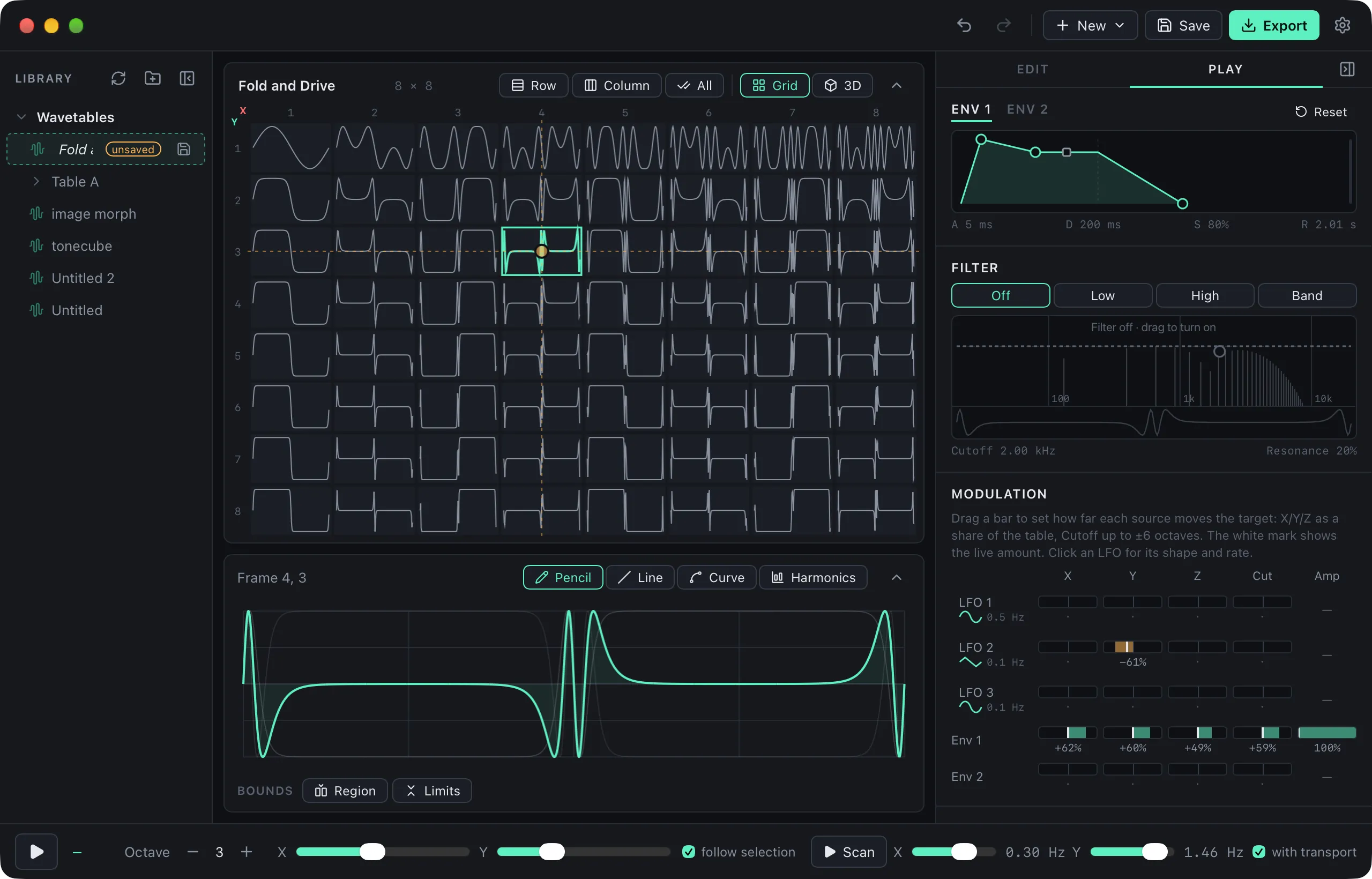
WaveStack Preview 4 (version 0.4.0) is out for Mac and Windows. The biggest change is that you can now play a table properly: the audition is a polyphonic synth with its own envelopes, LFOs and filter. Export has also been rebuilt around the synth or device a table is going to, and a new Morph option builds a 3D table out of two or more others. Download it here.
A synth to hear your tables with
The right-hand panel now has two tabs, Edit and Play. Play holds a small synth that reads the whole table, so a grid or volume plays through every frame rather than one row at a time.
- 8 voices, each with its own amplitude envelope. A second envelope sits beside the first, and both are shaped by dragging their corners.
- 3 LFOs with sine, triangle, saw, square and random shapes.
- A filter (low-pass, high-pass or band-pass, with resonance) that runs on every voice. It’s drawn over the selected frame’s spectrum, with the wave before and after the filter underneath, and you set cutoff and resonance by dragging a single handle.
- A modulation matrix that sends the LFOs and envelopes to the table’s X, Y and Z position and to the filter cutoff, and the envelopes to volume. Each amount is a bar you drag either way from zero, and a marker shows the live value as you play.
- MIDI input. The desktop app opens MIDI ports directly and uses note velocity. Pick one device, all of them or none. The computer keyboard still works too, and it now plays chords.
Your synth settings are remembered between sessions.
Export for where the table is going
Export used to split saving a file from sending to a device. Now it starts with one question: what is this table for? Pick WaveStack, Serum, Vital, Surge XT, the Disting NT or EX, the Deluge, or Other tools, and the choice sets the file format and frame size and checks the table against that target’s limits.
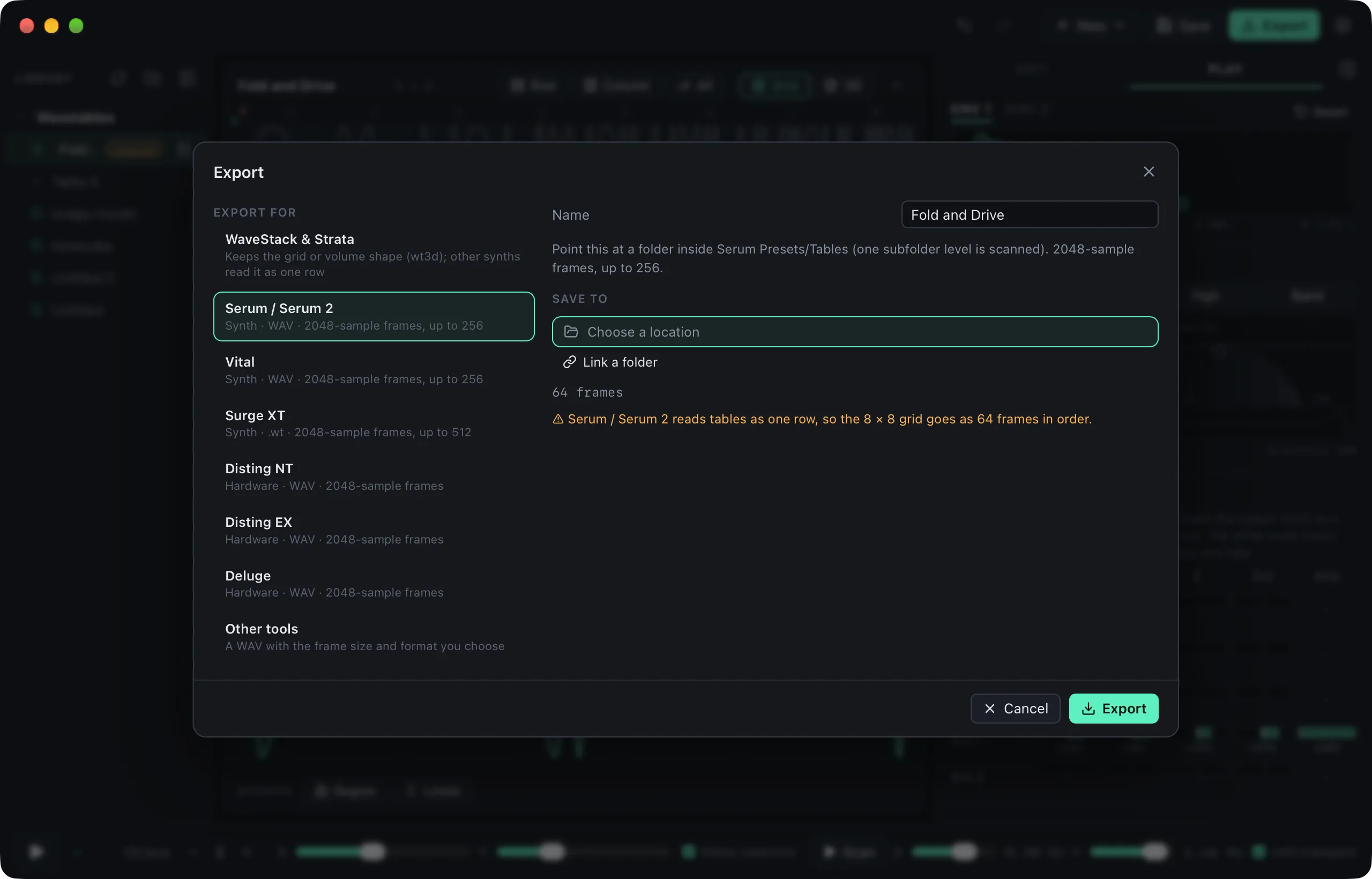
If the table doesn’t fit the target exactly, Export says what will happen. Serum, for example, reads every table as a single row, so an 8 × 8 grid goes out as 64 frames in order. You can save to any location, or link a folder such as an SD card or a synth’s wavetable folder and write straight into it. A linked folder shows what’s already there and can convert any files that need it. Export remembers your choices for each target, and the Devices panel is gone from the sidebar, so the library gets the full height of the window.
Morph between tables
New → Morph between tables takes two to six sources (images, wavetable files or the table you’re editing) and turns them into the layers of a 3D table. WaveStack fits them all to one grid, spreads them evenly through the volume and morphs every frame in between, using a spectral morph or a crossfade. Moving through Z then travels from one source to the next.
New ways to shape a frame
The harmonics editor has a Levels and Phases switch. In Phases mode the bars set each harmonic’s phase and leave the levels alone. There are also four phase actions for the selected frames:
- Align sets every phase to zero.
- Randomize scrambles them.
- Minimize peak rearranges the phases to lower the frame’s peak, so it can be up to about 4 dB louder at the same peak level with the same harmonics.
- Match phases gives the selection the current frame’s phases, so the frames morph smoothly into each other.
Process has a new Filter & phase section with low-pass, high-pass, band-pass, comb, dispersion and all-pass filters. They apply to the selected frames live as you drag, and the result is a single undo step. Dispersion, all-pass and comb are also new attributes in Build.
Build itself got more useful at the extremes. Tables built from the center now sound different at each end, where several attributes used to mirror themselves: skew becomes a phase bend on the negative side, sync becomes sub-sync, crush becomes decimation, and the low- and high-pass sweeps become resonant. Bit crush now reaches 2 bits and decimation 4 steps per cycle, so the whole range is clearly audible.
A tidier window
The library, inspector, table and frame editor can all be resized by dragging their edges, and minimized to a slim rail or a header. WaveStack remembers the layout. On the Mac, the title bar is now part of WaveStack’s own header.
The library picked up the file handling it was missing. You can name a table in place, at the top of the table panel or in the library, and each file has a ⋯ menu (or a right-click) to duplicate it, rename it on disk or show it in the Finder or File Explorer. New tables save to the top of your library folder unless you choose a folder.
Known limitations
The Windows installer still isn’t code-signed, so SmartScreen will warn when you open it: choose More info, then Run anyway. There’s no iPad build yet.
If you’d like to hear when the next preview is out, there’s a newsletter signup at the bottom of the home page.