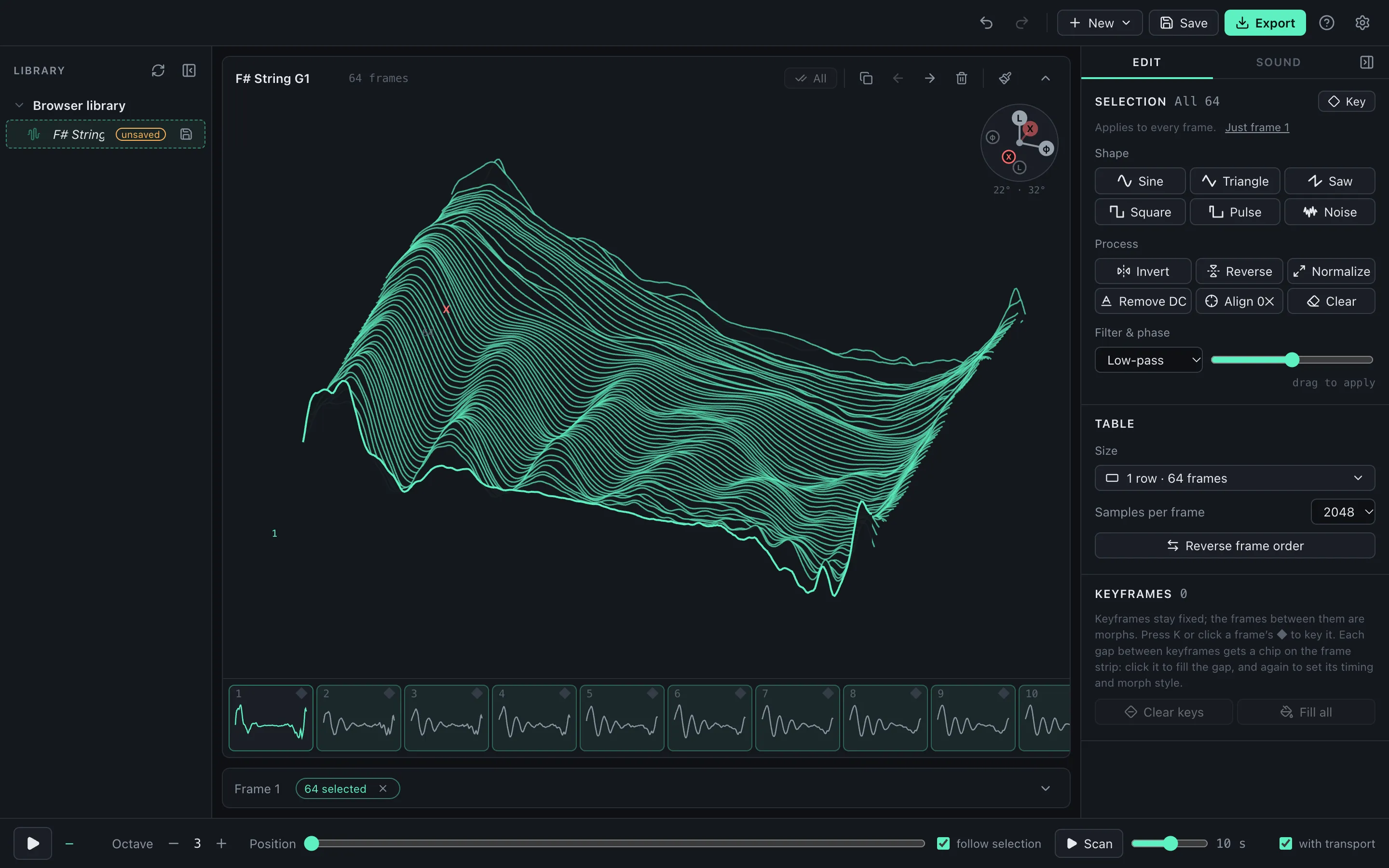
This guide takes four recordings (a synth note, a guitar note, a sung phrase and some thunder) through WaveStack’s Sample → wavetable dialog and compares the methods it offers for turning audio into frames. Every example has audio, and you can download all six tables to try in your own synth.
The scans below move through each finished table from its first frame to its last, the way a synth’s wavetable position knob or an LFO would. The wavetables chapter of Signal Function Set’s synthesis guide covers frames, position and blending with controls to try. The pitched examples play at C3; the thunder plays at the note that keeps its own pitch, which Why a table can sound higher than the recording explains. The Pitched cycles examples have Match phases applied; Keeping Pitched cycles smooth explains why.
What makes a good recording
A wavetable is a row of single cycles that a synth scans through (how wavetables work explains it with playable figures). Good source material changes slowly and steadily, so each frame is a little different from the one before:
- A held note on a synth, ideally with a slow filter sweep.
- A plucked string left to ring, which gets darker as it decays.
- A voice. A single held vowel is easiest; a phrase works with Spectral.
- A field recording: water, wind, traffic, thunder. These have no pitch, but Spectral and Raw slices can still capture their tone color.
Dry recordings work best. Reverb smears notes into each other, and several notes at once (a chord, or a melody in a reverberant room) leave no single pitch to find.
Expect a field recording to change character. A synth repeats each frame at the note you play, so thunder keeps its darkness and its rumble from frame to frame but becomes a pitched buzz rather than a roll.
The recordings here: Emily Singing Alto in a Tunnel by emilyzitek, F# String G1 by cabled_mess, and thunder1 by sophoclesarvanitis, all CC0 on Freesound, plus a synth note with a slow filter sweep.
Open it in WaveStack
Choose New › Sample and pick the file. Dropping an audio file on the window works too, as long as it isn’t already a tagged wavetable. WaveStack reads WAV, AIFF, MP3, FLAC and most other audio formats.
The top of the dialog shows the whole recording. Drag across it to choose the part to use; double-click to go back to the whole file. Trim silence is on to start with, so the range starts and ends where the sound does, and Skip silent gaps leaves out quiet stretches inside it.
WaveStack also picks a method for you: Pitched cycles if it can find a pitch, Spectral if it can’t.
Pitched cycles
Pitched cycles detects the pitch, works out how long one cycle lasts, and copies single cycles from evenly spaced points across the range. Each frame is a real piece of the recording, so it keeps the original waveform.
The synth sweep suits it well: it holds one pitch (WaveStack detected 82.34 Hz, an E) while the filter sweeps and the tone changes steadily.
The guitar note works the same way. WaveStack found 49.09 Hz, a low G on the F# string of an eight-string guitar, and the frames get darker as the note decays.
Pitched cycles needs one steady pitch. The vocal recording is a melody sung in a tunnel with a lot of reverb, so WaveStack finds no pitch in the file as a whole. Selecting the half-second note held at 3.3 seconds gives it one: 328.1 Hz, an E.
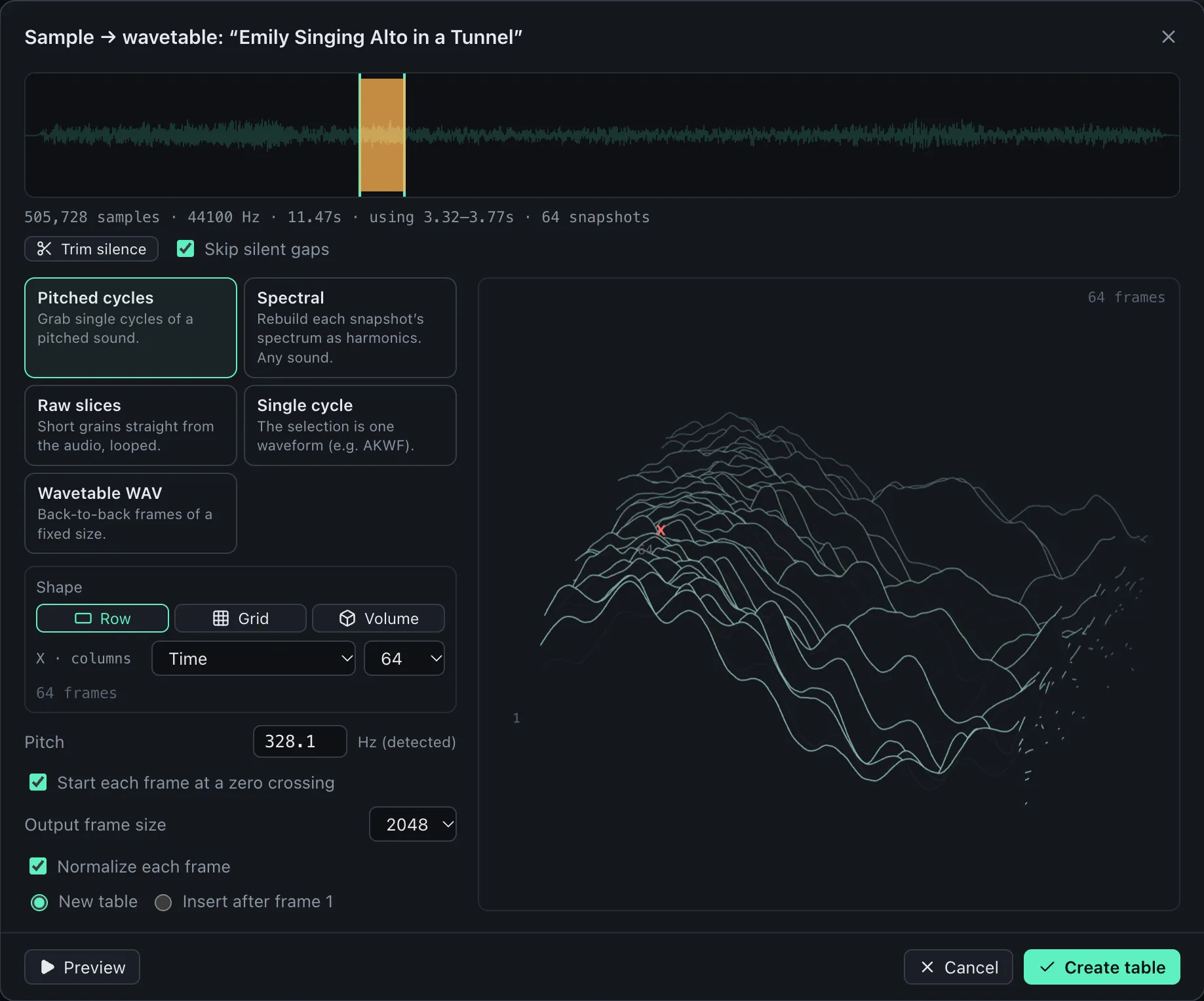
If the detected pitch is wrong, type the right one. The usual mistake is an octave too high or too low. Auto puts the detected value back.
Spectral
Spectral takes a snapshot of the sound at each point, measures how loud each harmonic is, and builds a new cycle from those levels. It doesn’t need to find cycles in the recording, so it works on sounds Pitched cycles can’t use: a melody, or a sound with no pitch at all. Below, Spectral uses the whole vocal phrase, the one WaveStack found no pitch in; for comparison, the second table is the held note through Pitched cycles.
Spectral has three settings:
- Fundamental: the pitch the harmonics are measured against. For a pitched recording, set it to the note’s pitch to capture its tone. For a sound with no pitch, it sets the note at which the table plays back at the recording’s own pitch (see below).
- Analysis window (4096 samples to start): longer windows resolve pitch more finely; shorter ones follow fast changes.
- Max harmonics (256 to start): the highest harmonic rebuilt. Lower it for a softer table.
Every Spectral frame loops cleanly and starts its harmonics in the same phase as its neighbors, so the frames morph smoothly into each other. The tradeoff is that the waveform no longer looks like the recording’s, even when the tone is close.
The thunder has no pitch, so WaveStack chose Spectral straight away. Only the first few seconds of the file are thunder; the rest is quiet background noise, which Normalize each frame would turn up to full level, so the range here is the 5 seconds from 2.5 to 7.5.
Raw slices
Raw slices copies a short grain from each point (20 ms to start, up to 500 ms) and squeezes it into one frame, fading its ends so it loops. It’s rougher than Spectral, with more of the recording’s grit.
Why a table can sound higher than the recording
A synth plays one frame per cycle of the note, so the note you play decides how fast the recording inside each frame goes by.
With Pitched cycles that’s what you want: each frame is one cycle of the source, and the note you play becomes its pitch.
With Spectral, the recording plays at its own pitch only at the note that matches the Fundamental. The thunder table above has a Fundamental of 55 Hz, so it plays true at A1, and each octave up raises the whole sound an octave. Played at C3, it sounds about an octave and a quarter higher:
With Raw slices, a slice plays at its own speed when one cycle of the note lasts as long as the slice. A 20 ms slice plays true at 50 Hz (1 ÷ 0.02 s). At C3, where a cycle lasts 7.6 ms, it plays about 2.6 times too fast; a 100 ms slice at C3 plays 13 times too fast, nearly four octaves up.
So to keep a sound low, either play the table low, or set the Fundamental (or the slice length) for the range you’ll play in.
The other methods
Two more methods are for files that are already waveforms: Single cycle, for one-cycle files such as the AKWF collection, and Wavetable WAV, for a wavetable that isn’t tagged with its frame size.
Keeping Pitched cycles smooth
A wavetable sounds best when each frame lines up with the next. If frame 12 starts at a different point in the cycle than frame 13, the two partly cancel as the synth moves between them, and the scan sounds hollow and uneven in level.
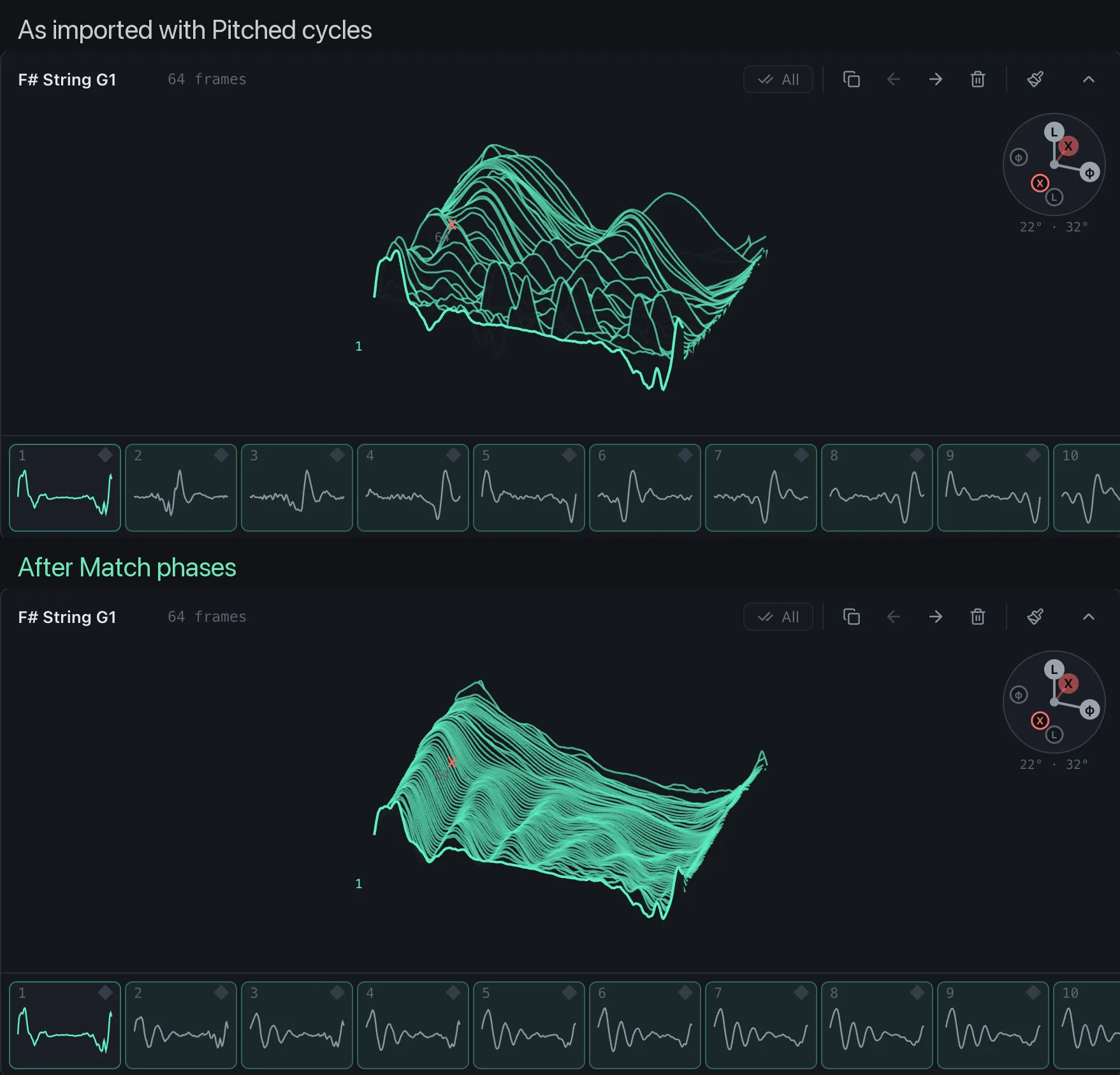
Pitched cycles has Start each frame at a zero crossing on by default, and it helps, but a bright sound crosses zero several times per cycle, so frames can still start at different points. You can see it in the frame strip below: the big peak wanders from frame to frame. To line them up:
- Click All above the frame strip to select every frame.
- Switch the frame editor to Harmonics.
- Choose Match phases in the Phase row. Every frame takes the current frame’s phases, so they line up.
The other source of trouble is a frame whose end doesn’t meet its start, which buzzes at the loop point. Pitched cycles cuts each frame to exactly one cycle of the detected pitch, so if the pitch drifts or the note decays within a cycle, the end lands a little away from the start. Select a short, steady part of the note, check the pitch, and listen with Preview. If a recording won’t sit still, use Spectral instead.
Keep Normalize each frame on, unless the change in level is part of the sound you want.
More than one row
One recording can fill a grid as well as a row. Under Shape, choose Grid and give each axis a role: Time for position in the recording, Method for a different conversion method at each step, Brightness to make each step darker, or Drive to add saturation. A guitar note with Time across and Brightness down gives a table you can scan in two directions on a synth that reads grids. Volume (Pro) adds a third axis.
Export it
Preview (or Space) plays a scan of the result before you commit, and Create table makes it. Then choose Export and pick your synth: WaveStack writes the frame size, frame count and tags each one expects, from Serum and Vital to Eurorack modules such as the E352.
For every option in the dialog, see importing samples. If you’d rather start from other people’s tables, see free wavetables.
Frequently asked questions
Can I make a wavetable from any sound?
Yes. A held synth note or a sung vowel can be cut into single cycles with Pitched cycles. Anything else, such as a sung melody, rain or thunder, works with Spectral or Raw slices. A table made from noise keeps the recording's tone color but becomes a pitched buzz, because a synth repeats each frame at the note you play.
Why does my wavetable sound higher than the recording?
With Spectral and Raw slices, the recording keeps its own pitch at only one note. For Spectral that's the note matching the Fundamental: with Fundamental at 55 Hz, play A1. For Raw slices it's the note whose cycle is as long as a slice: a 20 ms slice plays at its own speed at 50 Hz. Each octave higher on the keyboard plays the recording an octave higher.
What's the difference between Pitched cycles and Spectral?
Pitched cycles copies real cycles out of the recording, so it keeps the shape of the original waveform but needs one steady pitch. Spectral measures the level of each harmonic and builds a new cycle from those levels, so it works on any sound and always loops and morphs smoothly, but the waveform no longer matches the original.
Why does my wavetable sound hollow or click?
Usually because neighboring frames are out of phase, so they partly cancel as the synth moves between them, or because a frame's end doesn't meet its start. With Pitched cycles, select all frames and use Match phases in the Harmonics tool. Spectral frames don't have either problem.
How long should my recording be?
A few seconds is enough. A table holds up to 1024 frames and most synths read 256 or fewer. For Pitched cycles, even half a second of one held note gives 64 good frames.
What frame size should I use?
2048 samples for Serum, Vital, Surge and most software synths. WaveStack starts with the current table's frame size, and when you export for a particular synth or module it writes the frame size and frame count that instrument expects.